.avif)
Latenode
Productivity
Connect email, documents, CRM, and marketing tools to streamline customer data management and sales processes while enhancing user experience.


.svg)
Build powerful Retable integrations with popular business software and automate workflows effortlessly. Connect email, documents, CRM, and marketing tools to streamline customer data management and sales processes while enhancing user experience. Automate manual tasks with Latenode — no API knowledge required. Support business efficiency while reducing costs.
With Latenode andd Retable Integration you can;
- Run MCP Server: Run a free Retable MCP server on Latenode — give Claude, Cursor, and any AI model direct access to Retable through the Model Context Protocol.
- Automate a Workflow
What is Latenode?
Latenode is a low-code/no-code automation platform that enables users to create complex workflows and integrate apps using a visual drag-and-drop interface. It combines AI-powered tools, JavaScript customization, and 5,500+ integrations to automate business processes, such as CRM updates, web scraping, and AI agent orchestration.
What is Retable & Latenode integration for?
Retable integrations connect your data management hub to CRMs, communication tools, analytics platforms, and financial software. Teams use these connections to sync records across systems, trigger notifications when data changes, and eliminate manual data entry. Project managers link Retable to task tools. HR teams push employee records to payroll systems. Support teams route customer data to ticketing platforms. Sales teams automate lead captures from web forms into Retable databases.
Automating Retable workflows through Latenode removes the friction of point-to-point integrations. Our visual builder lets you design multi-step automations without coding, while Claude and Gemini analyze Retable data in real time. You pay only for compute, not per automation step, so scaling from five workflows to five hundred costs far less than legacy platforms. Our headless browser lets you interact with Retable's UI programmatically, capturing screenshots and extracting data that APIs alone cannot reach.
- Finance: Automatically sync Retable records to accounting software whenever invoice status changes.
- Marketing: Capture form submissions into Retable and instantly trigger personalized email campaigns.
- HR: Push new employee records from Retable to benefits platforms and send onboarding checklists.
Advanced users build self-hosted async flows with unlimited branching, letting Retable automations run 24/7 without manual intervention. Embed AI agents that read Retable tables, make decisions, and write results back—all in a single workflow. Combine JavaScript logic with NPM modules for complex transformations. Our community templates accelerate deployment, and expert support helps you move beyond basic syncs into intelligent data orchestration.
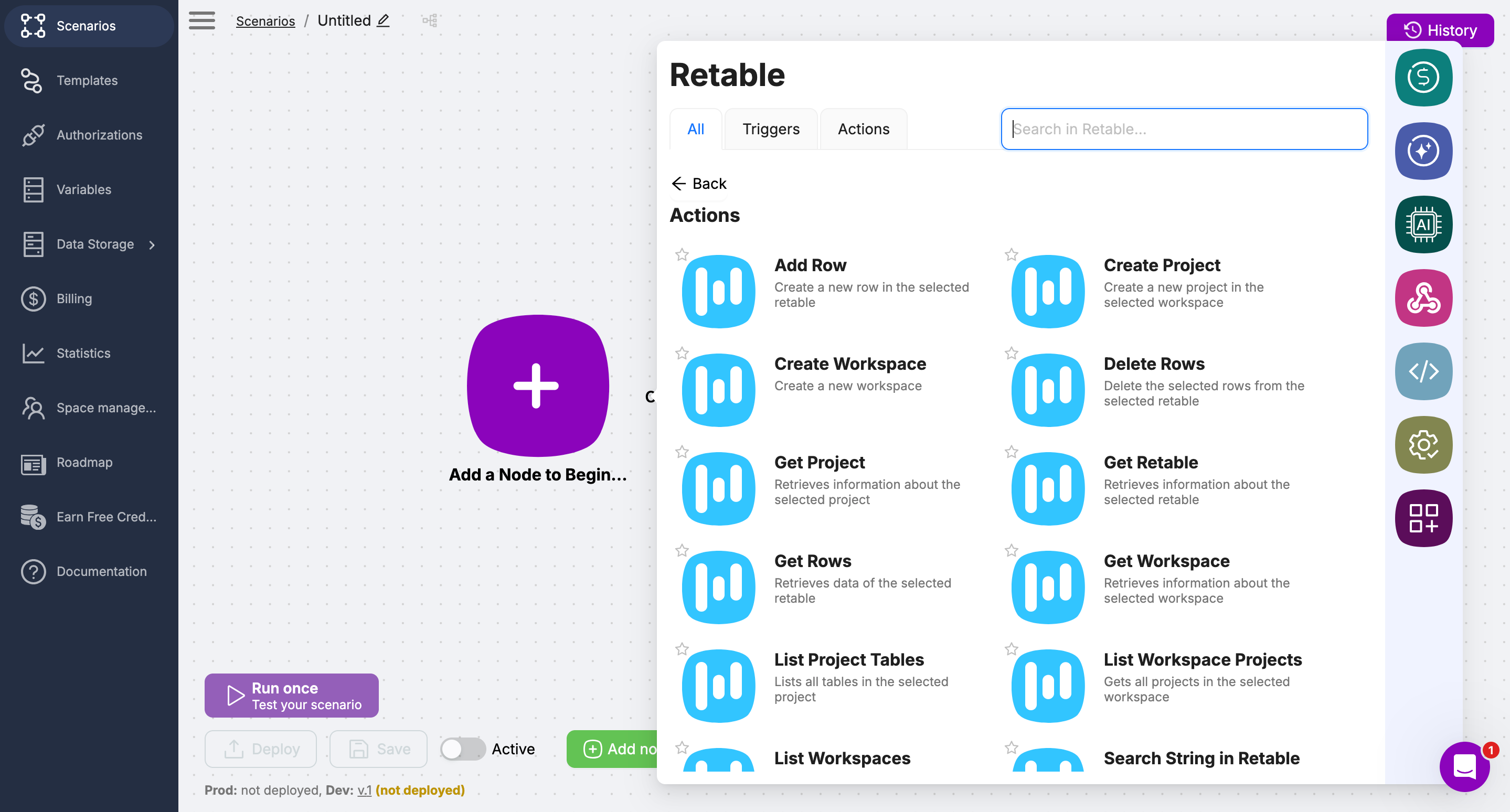
Actions of the Retable and Latenode integration
- Add Row
- Create project
- Create workspace
- Delete rows
- Get project
- Get Retable
- Get rows
- Get workspace
- List project tables
- List workspace projects
- List workspaces
- Search string in Retable
- Update row
- Upload file to project
Triggers of the Retable and Latenode integration
- New row
How to use Retable integrations in Latenode?
Retable integrations in Latenode connect your spreadsheet data to multi-step workflows without manual entry. This matters because teams can sync records across departments, trigger actions based on table changes, and maintain data consistency across all business systems in real time.
Here's how to use Retable integration in Latenode:
- Add the node: Search for Retable in the integrations library and drag it into your workflow.
- Authenticate your account: Connect your Retable workspace using your API key or OAuth credentials.
- Select table and action: Choose your table, then pick an action like read, create, update, or delete records.
- Map your data: Link fields from previous steps to Retable columns to pass information through the workflow.
These steps enable you to sync leads to CRM systems, update project status across teams, and route customer data to support tickets. Retable becomes the source of truth that feeds downstream processes, ensuring all departments work with current information.
- Real-time data sync: Changes in Retable trigger actions instantly across your connected apps.
- Reduced manual work: Teams stop copying data between tools and focus on higher-value tasks.
- Error-free records: Workflows enforce consistent formatting and validation rules across all systems.
How to get your Retable API key

- Go to your Retable account.
- Click your profile icon and open the API section
- Enable your API key
- Copy your API key
How to start
- Sign in to Latenode
- Go to your dashboard
- Click "Create a new scenario"
- Click "Add a node to begin"
- From the choose an app menu select "Retable"
- Choose yourr action type from the list
- Connect Retable with Latenide with your Retable API Key
- Then, follow the steps on Latenode to finish your integration.
mORE
Retable Integration

Boost Space
Centralize data and automate business processes with Boost Space and Retable

Firmao
Manage your CRM seamlessly with Firmao and Retable.

Airtable
Easily import your Airtable bases into Retable without integrating with a third-party tool!
Create your smart data management solution
Plan, track, and analyse with your ease. Transform your data with an all-in-one platform, collaborate with your teammates.
Try for free!